
Best Monitor Stands for Home Office and Remote Work
Best Monitor Stands for Home Office and Remote Work
Key Takeaways
A monitor stand can raise your screen and help organize your home office desk.
Monitor risers are simple, affordable, and easy to install.
Adjustable monitor arms provide greater flexibility and can free up desk space.
The Ergotron LX is a premium option for single-monitor setups.
HUANUO offers practical options for dual-monitor workstations.
Always check monitor weight, VESA compatibility, and desk mounting requirements before buying.
A comfortable home office starts with a workspace that fits your daily routine. If your computer monitor sits too low or takes up too much desk space, a monitor stand may be a useful upgrade.
The right monitor stand can help you position your display more comfortably, organize accessories, and create a cleaner workstation. Whether you work remotely full-time, freelance from home, or manage a small business, there are several monitor stand styles worth considering.
This guide compares popular options and explains how to choose the right monitor stand for your desk.
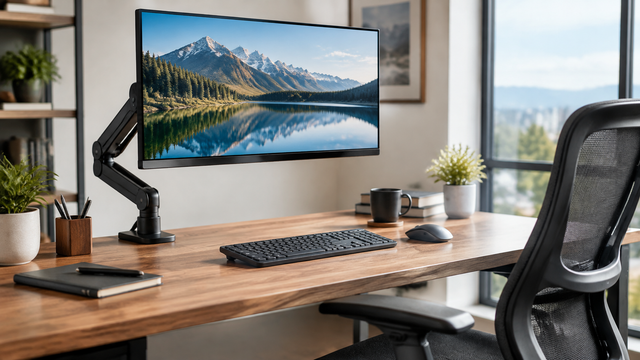
Why You Need a Monitor Stand for Your Home Office
Many standard monitor stands offer limited height adjustment. This can make it difficult to position the screen comfortably, especially when using a laptop and external monitor together.
A monitor stand or monitor arm gives you more control over your workstation.
Benefits may include:
Raising your display to a more suitable viewing height.
Creating additional space underneath your monitor.
Improving desk organization.
Adjusting the screen angle and position.
Supporting a cleaner, more professional home office appearance.
A monitor stand is not a complete ergonomic solution, but it can be a practical part of a better workstation setup.
5 Best Monitor Stands for Home Office
1. Ergotron LX Single Monitor Arm – Best Premium Choice
The Ergotron LX Single Monitor Arm is a premium option for professionals who want flexible screen positioning.
Its adjustable arm allows you to move your monitor vertically, horizontally, and closer to or farther from your desk position. This flexibility is useful when switching between different work tasks.
Key features:
Adjustable monitor positioning.
Desk-clamp and compatible mounting options.
Cable management features.
Supports compatible VESA monitors.
Durable construction.
Best for: Full-time remote workers and professionals using one main monitor.
Consider it if: You want a long-term monitor mounting solution with a wide range of movement.
2. HUANUO Dual Monitor Stand – Best for Two Monitors
The HUANUO Dual Monitor Stand is designed for people who use two displays for multitasking.
A dual-monitor setup can be useful for video meetings, spreadsheets, research, writing, and managing multiple applications. An adjustable dual-monitor mount helps position both screens within your workspace.
Key features:
Supports compatible dual-monitor setups.
Adjustable screen positioning.
Desk-mounted design on selected models.
Cable management features on supported versions.
Suitable for productivity-focused workstations.
Best for: Remote employees, analysts, developers, and multitasking professionals.
Consider it if: You regularly work with two monitors and want to reduce desk clutter.
3. VIVO STAND-V001 – Best Budget Monitor Arm
The VIVO STAND-V001 is a budget-friendly single-monitor mounting option.
It offers a simple way to elevate and position a compatible monitor without investing in a premium arm. It can be a practical choice for people building their first home office.
Key features:
Single-monitor mounting.
Adjustable positioning.
Desk-clamp installation.
VESA compatibility.
Space-saving design.
Best for: Students, freelancers, and budget-conscious remote workers.
Consider it if: You want a basic monitor arm for a standard-sized display.
4. HUANUO Monitor Riser – Best Simple Desktop Stand
A HUANUO Monitor Riser is a practical alternative to a desk-mounted arm.
A freestanding riser sits directly on your desk and raises the monitor without requiring a clamp or drilling. Some designs include storage space underneath for a keyboard, notebook, or small accessories.
Key features:
Simple desktop installation.
Elevated monitor position.
Storage space on selected models.
No desk-clamp requirement.
Suitable for many standard workstations.
Best for: People who prefer a simple setup with minimal installation.
Consider it if: You want to raise your monitor while keeping your existing desk arrangement.
5. Monoprice Workstream Single-Monitor Desk Mount – Best for Larger Displays
The Monoprice Workstream Single-Monitor Desk Mount is worth considering for compatible larger monitors.
Its adjustable arm and desk-mounted design can help create more usable space on your desktop. Before purchasing, verify the exact model's supported monitor size, weight range, and mounting requirements.
Key features:
Adjustable monitor arm.
Desk-clamp mounting.
Cable management on supported models.
Compatible VESA mounting.
Designed for selected larger displays.
Best for: Professionals using larger monitors or ultrawide displays.
Consider it if: Your monitor is heavier or wider than a typical office display and you need a suitable mounting solution.
Quick Comparison: Which Monitor Stand Should You Choose?
| Monitor Stand | Best For | Main Advantage |
|---|---|---|
| Ergotron LX | Premium single-monitor setup | Flexible positioning |
| HUANUO Dual Monitor Stand | Two-monitor workstation | Dual-screen support |
| VIVO STAND-V001 | Budget buyers | Affordable monitor mounting |
| HUANUO Monitor Riser | Simple desk setup | Easy installation |
| Monoprice Workstream Mount | Larger compatible monitors | Adjustable desk mount |
Product specifications and compatibility can vary by model. Check the manufacturer's current information before purchasing.
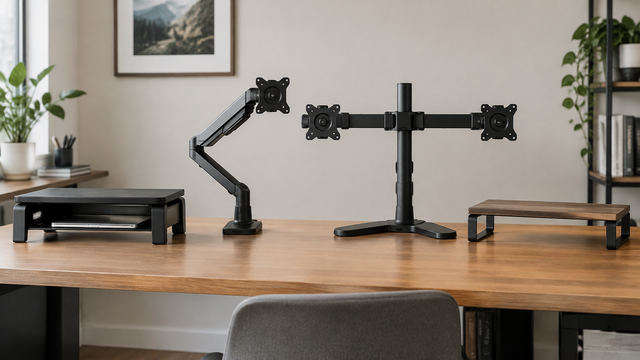
Monitor Riser vs. Monitor Arm: Which Is Better?
Monitor risers and monitor arms serve similar purposes, but they work differently.
Choose a Monitor Riser If:
You want a simple, affordable solution.
You prefer not to clamp anything to your desk.
Your monitor does not need frequent repositioning.
You want storage space underneath the screen.
Choose a Monitor Arm If:
You need frequent height or angle adjustments.
You want to free up desk surface space.
You use multiple monitors.
You need to move your screen closer or farther away during work.
A riser is usually easier to install, while an adjustable arm provides greater positioning flexibility.
What to Check Before Buying a Monitor Stand
Before ordering a monitor stand online, check these important details.
1. Monitor Weight and Size
Your monitor must fall within the stand's supported weight and size range. Do not rely on screen size alone; check the monitor's actual weight without its original stand when the product requires that measurement.
2. VESA Compatibility
Many monitor arms use VESA mounting patterns, commonly 75 × 75 mm or 100 × 100 mm.
Check the back of your monitor or its manual to confirm whether it supports VESA mounting. Some displays require a separate adapter.
3. Desk Thickness
Desk-mounted arms use clamps or grommet mounts. Confirm that your desk thickness and edge design are compatible with the selected mount.
4. Adjustment Range
Look for the movement you actually need, such as height adjustment, tilt, swivel, or screen rotation.
5. Cable Management
Cable clips or built-in channels can help keep monitor, power, and accessory cables organized.
How to Position Your Monitor for a More Comfortable Workspace
A monitor stand works best when the screen is positioned correctly.
Place your main monitor directly in front of you.
Keep the screen at a comfortable viewing distance.
Position the display so you can view it without constantly tilting your head.
Adjust the screen angle to reduce reflections.
Keep your keyboard and mouse positioned comfortably.
For additional workstation guidance, read the official OSHA Computer Workstations Ergonomics Guide. It covers monitor placement, workstation arrangement, and other factors that contribute to a more comfortable computer workspace.
Final Verdict: Which Monitor Stand Is Best for Your Home Office?
The best monitor stand depends on your monitor, desk, and working habits.
Choose the Ergotron LX for a premium single-monitor setup.
Choose a HUANUO Dual Monitor Stand for a two-screen workstation.
Choose the VIVO STAND-V001 for a budget-friendly monitor arm.
Choose a HUANUO Monitor Riser for simple desktop elevation.
Choose the Monoprice Workstream Mount for a compatible larger display.
Before buying, check your monitor's weight, VESA pattern, and desk compatibility. A suitable monitor stand can help you create a more organized and comfortable home office without replacing your entire workstation.
What's Your Favorite Monitor Stand?
A well-positioned monitor can make your home office feel more organized and easier to use. Whether you prefer a simple riser or a fully adjustable monitor arm, choose a design that fits your desk and daily workflow.
Do you use a monitor stand or an adjustable monitor arm? Share your setup, favorite model, or questions in the comments below. If this guide helped you, share it with another remote worker who wants to improve their home office!


No comments