
How to Reduce Back Pain While Working from Home
How to Reduce Back Pain While Working from Home
Working from home offers flexibility, convenience, and freedom from daily commuting. However, spending several hours sitting at a desk can create physical discomfort, especially when your workspace isn't properly arranged.
For many remote workers, freelancers, and entrepreneurs, lower back discomfort becomes an unwanted part of the workday. Poor seating, incorrect monitor height, prolonged sitting, and limited movement can contribute to muscle fatigue and back discomfort.
The good news is that a few practical changes can make your home office more comfortable. From adjusting your chair to taking regular movement breaks, you can build healthier working habits without spending a fortune.
In this guide, we'll explore practical ways to reduce back discomfort while working from home.
Key Takeaways
Choose an office chair with appropriate lumbar support.
Keep your feet flat on the floor or use a footrest.
Position your monitor at a comfortable viewing height.
Avoid working for hours without changing positions.
Use a laptop stand with an external keyboard and mouse.
Alternate between sitting, standing, and walking.
Include gentle movement breaks throughout the day.
Seek medical advice when back pain persists or comes with warning signs.
1. Invest in a Comfortable Ergonomic Office Chair
Your office chair plays an important role in your home workstation.
An uncomfortable chair may encourage slouching, unsupported sitting, and awkward positions that contribute to back discomfort.
Look for an ergonomic chair with these features:
Adjustable seat height.
Lumbar support.
Comfortable seat cushioning.
Adjustable backrest.
Suitable seat depth.
Armrests that support relaxed shoulders.
Why Lumbar Support Matters
Lumbar support helps maintain the natural inward curve of your lower back.
Choose a chair that supports your lower back without forcing you into an uncomfortable position.
If you cannot afford a new ergonomic chair, try placing a small lumbar cushion or rolled towel behind your lower back.
Pro Tip: Your feet should rest comfortably on the floor. If your chair is too high, use a stable footrest.
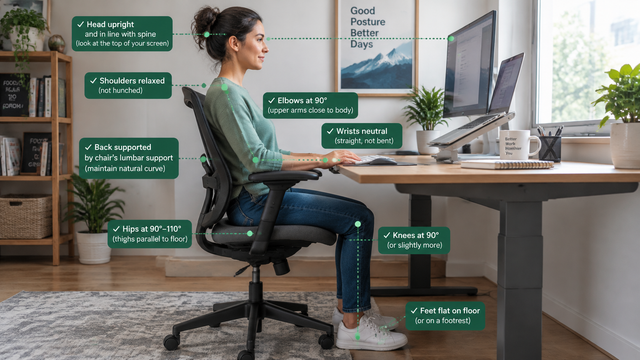
2. Maintain Proper Sitting Posture
Your sitting position matters when you spend much of the day working at a computer.
A poorly arranged workstation may encourage you to lean forward, round your shoulders, or bend your neck for extended periods.
Try these workstation adjustments:
Keep your back supported by the chair.
Relax your shoulders.
Keep your elbows close to your body.
Position your feet flat on the floor.
Keep your knees approximately level with your hips or slightly lower.
Avoid twisting your torso while working.
Keep frequently used items within easy reach.
Remember, there isn't one perfect sitting position for everyone. Changing positions regularly is more practical than trying to maintain a rigid posture throughout the day.
3. Adjust Your Monitor and Laptop Height
One common home office mistake is placing a laptop directly on a desk for extended periods.
This can encourage you to bend your neck and lean forward to see the screen.
How to Position Your Monitor
For a more comfortable workstation:
Position your monitor directly in front of you.
Keep the screen approximately an arm's length away.
Position the top of the display at or slightly below eye level.
Adjust the screen to minimize glare.
Avoid leaning forward to read small text.
Use a Laptop Stand
If you primarily work from a laptop, consider purchasing:
An adjustable laptop stand.
An external keyboard.
An external mouse.
This allows you to raise your screen while keeping your keyboard and mouse at a more comfortable working height.
4. Take Regular Movement Breaks
One of the simplest ways to improve your home office routine is to stop sitting continuously for long periods.
Even a well-designed ergonomic chair cannot replace regular movement.
Try incorporating these habits:
Stand up between meetings.
Walk around your apartment periodically.
Stretch gently during breaks.
Take a short walk during lunchtime.
Alternate between different working positions.
The CDC's National Institute for Occupational Safety and Health (NIOSH) recommends regular breaks and changes in posture. Its workplace guidance discusses research in which adding hourly five-minute breaks to conventional breaks reduced musculoskeletal discomfort and eyestrain.
A practical starting point is to take a short movement break every hour.
5. Try a Sit-Stand Desk
A standing desk can make it easier to change your working position throughout the day.
You don't need an expensive electric standing desk. A desk converter or adjustable workstation may provide a more affordable alternative.
Benefits of Changing Positions
Alternating between sitting and standing can help you:
Avoid remaining in one position for too long.
Change the muscles supporting your body.
Move more frequently throughout the workday.
Create a more flexible workstation.
However, standing continuously isn't the solution either. Prolonged standing can also cause discomfort.
Start with short standing periods and gradually find a comfortable balance between sitting, standing, and walking.
6. Practice Gentle Stretches and Movement
Gentle movement can help reduce stiffness associated with staying in one position.
Consider these simple movements during your breaks.
Shoulder Rolls
Relax your arms.
Slowly roll your shoulders backward.
Repeat several times.
Reverse the direction.
Gentle Standing Back Extension
Stand comfortably with your feet apart.
Place your hands on your hips.
Gently extend your upper body backward within a comfortable range.
Return to your normal standing position.
Short Walks
Walk around your home or step outside for a few minutes.
Walking provides an opportunity to move different muscle groups rather than remaining seated.
Important: These movements are general wellness suggestions, not treatments for every type of back pain. Avoid movements that increase pain, and ask a healthcare professional about suitable exercises if you have an existing back condition.
7. Avoid Working From Your Bed or Sofa
Working from your bed may seem convenient, especially when you're tired. However, soft surfaces often make it difficult to maintain a supported working position.
Common problems include:
Rounded shoulders.
Unsupported lower back.
Bent neck position.
Poor laptop placement.
Limited leg support.
The CDC/NIOSH recommends using an office chair with back support rather than working for prolonged periods from a couch or soft chair.
If you occasionally need to work from a sofa, use cushions to support your back and place your laptop on a stable surface.
Whenever possible, use a dedicated desk and chair for your regular working hours.
8. Improve Your Home Office Workspace
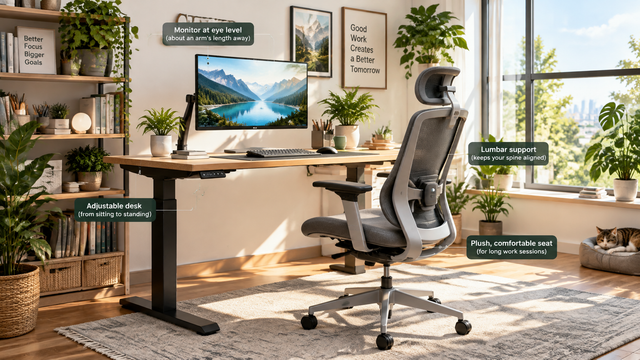
A comfortable workstation doesn't necessarily require expensive furniture.
Small improvements can make a difference.
Consider these affordable accessories:
| Office Accessory | Purpose |
|---|---|
| Lumbar cushion | Adds lower-back support |
| Laptop stand | Raises screen height |
| External keyboard | Allows independent keyboard positioning |
| External mouse | Improves mouse placement |
| Footrest | Supports comfortable foot positioning |
| Monitor stand | Raises the display |
| Adjustable chair | Improves seating flexibility |
Before purchasing anything, identify what is uncomfortable about your existing setup.
You may only need one or two adjustments rather than replacing your entire workstation.
9. Build Healthy Workday Habits
Your daily routine also affects how comfortable you feel while working remotely.
Try developing these habits:
Begin your day with light movement.
Avoid sitting continuously during long meetings.
Take regular walking breaks.
Maintain a consistent sleep schedule.
Stay physically active outside working hours.
Adjust your workstation when discomfort develops.
Give yourself time away from screens.
Regular physical activity can support general health and help you maintain an active lifestyle.
If you experience recurring back discomfort, consider discussing an appropriate activity plan with a healthcare professional.
10. When Should You See a Doctor for Back Pain?
Most back discomfort isn't an emergency, but persistent or unusual symptoms should not be ignored.
Consider arranging a medical evaluation if:
Your pain continues or gets worse despite self-care.
Pain travels down one or both legs.
You experience persistent numbness or tingling.
Back pain affects your daily activities.
Symptoms develop after a fall or injury.
Seek emergency medical attention if back pain occurs with new loss of bladder or bowel control, numbness around the groin or saddle area, or significant or progressive leg weakness.
Back pain can have different causes, and an ergonomic adjustment alone may not address the underlying problem.
Frequently Asked Questions (FAQs)
1. How can I reduce lower back pain while working from home?
Use a supportive chair, position your monitor correctly, keep your feet supported, and take regular movement breaks.
2. Is sitting all day bad for your back?
Remaining in one position for extended periods can contribute to muscle fatigue and discomfort. Changing positions and moving regularly can help.
3. Is a standing desk good for back discomfort?
A standing desk allows you to alternate between sitting and standing. However, avoid standing continuously and include regular movement.
4. What is the best chair for working from home?
Look for an adjustable ergonomic chair with suitable lumbar support, comfortable cushioning, and appropriate seat dimensions.
5. How often should I take breaks while working?
A practical starting point is a short movement break every hour. You can also take brief breaks between meetings and during screen-intensive tasks.
6. Can a laptop stand help reduce back discomfort?
A laptop stand can raise the screen to a more comfortable viewing height. Pair it with an external keyboard and mouse for a better overall workstation arrangement.
Final Thoughts
Working from home shouldn't mean spending your entire day dealing with an uncomfortable back.
A supportive chair, correctly positioned monitor, regular movement breaks, and a well-organized workstation can help create a more comfortable working environment.
Start with small improvements instead of trying to change everything at once. Adjust your chair, improve your screen position, and build regular movement into your daily routine.
Most importantly, listen to your body. Persistent or concerning back pain deserves professional medical attention rather than relying only on furniture changes or online advice.
A healthier home office starts with better everyday habits.


No comments